

Publishing more articles should raise visits, yet many sites see the opposite. A website traffic drop usually has a specific cause, such as changed search intent, competing pages on your own site, technical faults, or shifts in how results pages display answers. This guide explains how to confirm the decline is real, find the cause using Google Search Console and Google Analytics, and repair it in a clear order.
How Do You Confirm a Traffic Drop Is Real?
Start by separating a genuine decline from noise. Reporting errors and seasonal patterns often look like lost visitors.
Compare the right data
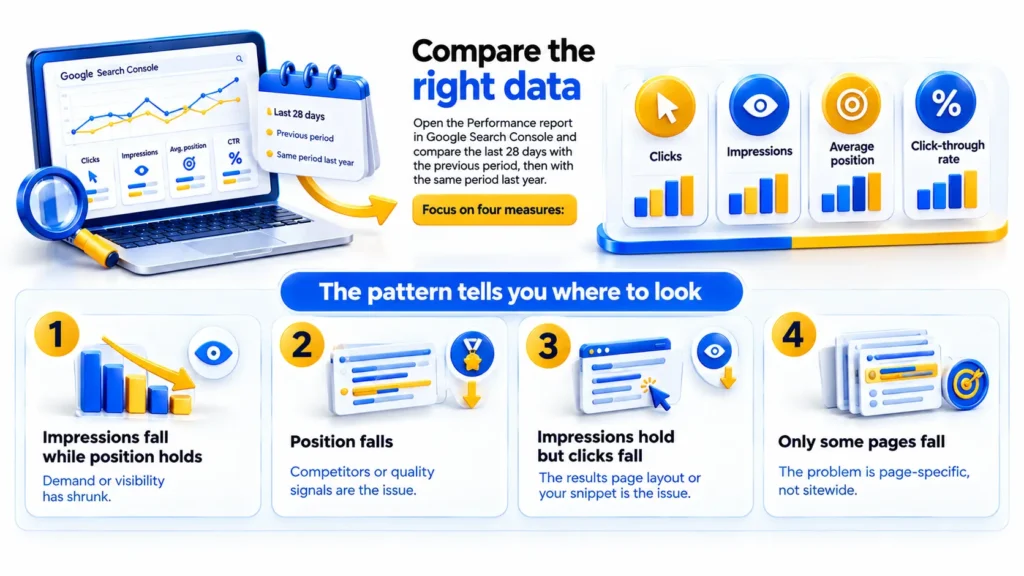
Open the Performance report in Google Search Console and compare the last 28 days with the previous period, then with the same period last year. Focus on four measures: clicks, impressions, average position, and click-through rate.
The pattern tells you where to look:
- Impressions fall while position holds: demand or visibility has shrunk.
- Position falls: competitors or quality signals are the issue.
- Impressions hold but clicks fall: the results page layout or your snippet is the issue.
- Only some pages fall: the problem is page-specific, not sitewide.
Rule out tracking errors and seasonality
Check that your Google Analytics tag still fires on every page template, especially after a theme update, plugin change, or consent banner change. A broken tag can imitate a collapse in visitors. Also compare against previous years, because many industries have predictable peaks and slumps tied to exams, festivals, budgets, or weather.
Why Is Website Traffic Falling When You Publish More Content?
More pages do not guarantee more visits. Each new page must earn its place in search results by serving a need better than the alternatives. These are the most common reasons it fails.
Content does not match search intent
Search intent is the goal behind a query. Someone searching “how to” wants steps, someone searching “best” wants comparisons, and someone searching a service name may want to hire. If your page answers a different question than the one people are asking, search engines notice weak engagement and show better matches instead.
Review the top results for your target query. Note the format, depth, and angle they share, then compare your page honestly.
Pages compete with each other
Keyword cannibalization happens when several pages on one site target the same query. Search engines struggle to choose the best page, so positions swing between them and none performs strongly. Publishing a fifth post on a topic you already cover can weaken the four earlier ones.
Fix it by merging overlapping posts into one authoritative page, redirecting the retired URLs, and giving each remaining page a distinct purpose.
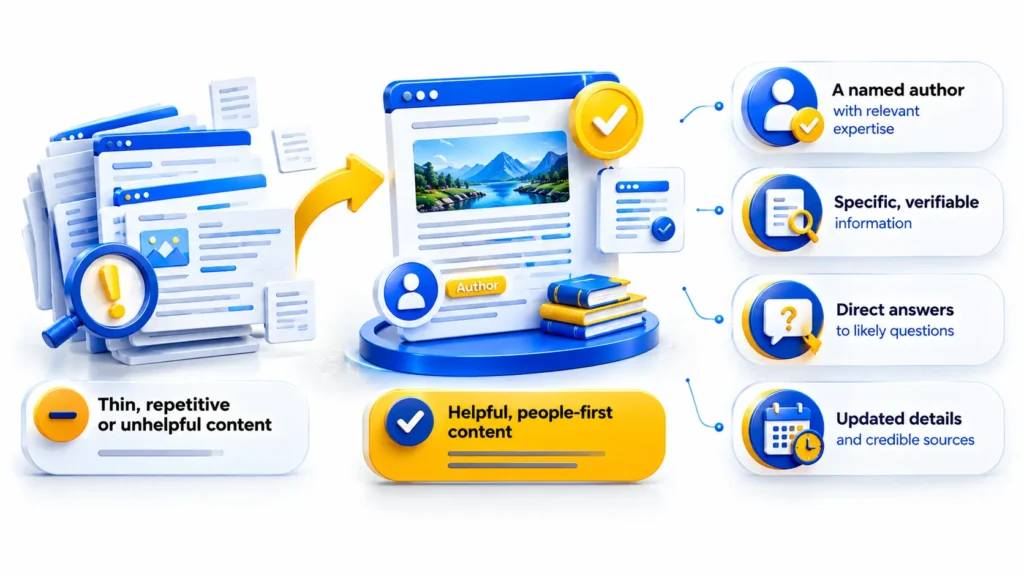
Content is thin, repetitive, or unhelpful
Publishing at volume often lowers average quality. Google’s guidance on helpful, people-first content asks whether a page offers original information, a complete answer, and real value beyond what already exists. Posts that rewrite top results without adding experience, data, or clear expertise rarely hold their positions.
Strong pages usually show:
- A named author with relevant expertise
- Specific, verifiable information
- Direct answers to likely questions
- Updated details and credible sources
Topical coverage is shallow
Isolated posts on unrelated subjects dilute a site’s focus. Search engines assess whether a site covers a subject thoroughly, including related questions and entities. A core page with linked supporting articles signals depth. Random posts chasing trending phrases do not.
Older pages have gone stale
Your best performers may be decaying while you focus on new posts. Outdated advice, broken links, and old screenshots reduce usefulness. Refreshing a proven page often returns more traffic than writing a new one.
Technical Problems That Quietly Reduce Traffic
New content cannot perform if search engines struggle to reach or process your site. Check these areas first:
- Indexing: use the Pages report in Google Search Console to find URLs marked “Crawled, currently not indexed” or blocked by noindex tags.
- Robots rules: confirm robots.txt is not blocking important folders, a common mistake after a site migration or staging launch.
- Redirects and canonicals: chains, loops, and wrong canonical tags send signals to the wrong URL.
- Page experience: slow loading, layout shifts, and poor mobile usability push visitors away. The Core Web Vitals report shows which templates need work.
- Internal linking: new posts with no links pointing to them are hard to discover and appear less important.
- Site changes: redesigns, URL changes, and plugin updates often cause sudden drops, so match the date of your decline against your change log.
How Search Results Pages Are Changing
Sometimes positions stay stable but visits still fall. Search results now include featured snippets, AI-generated overviews, video carousels, maps, and shopping units. These features answer many questions directly, so fewer people click through. This is often called zero-click search.
Adapt to answer-style results
You cannot block this shift, but you can adapt. Target queries where users need depth, tools, or services. Write concise answers near the top of each section so your page can be cited. Add original details a summary cannot replace, such as processes, templates, comparisons, and expert judgment.
Check whether snippets earn clicks
A page can rank well and still lose visits if its title and meta description fail to promise a clear benefit. Compare click-through rate by query in Google Search Console. Rewrite titles that are vague, truncated, or identical across pages.
Look at announced algorithm changes
Google publishes ranking updates on its Search Status Dashboard. If your decline began on an announced date, read the official guidance for that update before changing anything. Reacting without evidence often causes further harm.
Competitors, Links, and Brand Demand
Search is relative. Your traffic can fall even when your site is unchanged, because other pages improved.
Competitors have improved
Competing sites may have added richer content, better visuals, faster pages, or stronger authority. Analyse who now holds your lost positions and what they provide that you do not.
Backlinks have weakened
Links from relevant, trusted sites remain an important signal of authority. Lost links, or a profile built on low-quality sources, can slow your progress. Earn links by publishing original research, tools, and genuinely useful resources.
Brand demand is flat
When people search for your business name, it shows trust. If branded searches stay flat, your content may reach audiences who never remember or return. Newsletters, social media marketing, and consistent publishing help build repeat visits.
A Step-by-Step Plan to Recover Traffic
- Confirm the drop in Google Search Console and Google Analytics, and note the exact start date.
- Segment the data by page, query, and device to find where the loss sits.
- Audit indexing, redirects, speed, and mobile usability.
- Match the decline with site changes and official update announcements.
- Identify cannibalizing pages and merge them.
- Rewrite pages that miss search intent, adding original value.
- Refresh older pages that once performed well.
- Strengthen internal links to priority pages.
- Track results for several weeks before making further changes.
Recovery takes time. Search engines need to recrawl and reassess pages, and nobody can promise a particular result or timeline.
Mistakes to Avoid During Recovery
Panic often creates a second problem. Avoid these:
- Rewriting every page at once, which makes it impossible to see what worked
- Deleting pages that still earn links or impressions
- Changing titles and URLs without redirects
- Chasing every algorithm rumor instead of reading official documentation
- Judging results after only a few days
When Should You Get Professional Help?
If the cause is not clear after a basic audit, or the drop affects leads and revenue, an experienced team can save time. A technical audit, content audit, and analytics review usually reveal the pattern faster. Teams such as Dotcom Creativez, which handle SEO, content, and website work together, are well placed to connect issues that overlap.
For businesses seeking local support, a digital marketing agency in Calicut can review local search visibility, Google Business Profile, and website performance together. Choose a provider that explains its findings, shares clear reporting, and avoids guaranteed ranking promises.
Frequently Asked Questions
Why is my website traffic dropping even though I post regularly?
Frequency does not equal value. Traffic usually falls because of search intent mismatch, overlapping pages, technical faults, outdated content, or changes in the results page layout. Google Search Console shows which factor applies.
How long does it take to recover from a traffic drop?
It depends on the cause. Fixing a tracking error shows results at once, while content and quality improvements may take weeks or months for search engines to recrawl and reassess.
Can a Google algorithm update cause my traffic to fall?
Yes. Compare the date of your decline with the Google Search Status Dashboard. If the dates align, review Google’s published guidance for that update and improve the affected pages.
Should I delete low-performing posts?
Not automatically. Improve, merge, or redirect pages that have value or links. Remove only pages with no traffic, links, or purpose, and handle their URLs properly.
Do AI-generated search answers reduce clicks?
They can for simple informational queries. Pages that offer original expertise, tools, or services still attract visits from users who need more than a summary.
What to Do Next
A traffic decline is a diagnostic problem, not a content volume problem. Confirm the data, check technical health, match each page to search intent, merge overlapping posts, and refresh older winners before producing more. Whether you handle the audit in house or work with a team such as Dotcom Creativez, the principle is the same: diagnose first, then act.