
Google Ads getting clicks but no leads is one of the most common and expensive problems in paid search. Spend rises, reports look busy, yet the phone stays quiet. This article explains what the problem means, the ten most frequent causes, how it appears across different industries, when low volume is normal, and how to diagnose and repair each leak in a sensible order, so your budget produces enquiries rather than visits.
What Google Ads Getting Clicks but No Leads Actually Means
It means your ads earn visits but those visits do not produce calls, form submissions or messages. The auction rewards relevance and bids, so a click confirms only that an ad was appealing enough to tap.
Clicks, Conversions and Leads Explained
A click is a visit that Google bills you for. Conversions are actions you define and track, such as form submissions or calls. Qualified leads are conversions from people who fit your offer, budget and location. The three numbers can diverge sharply, and only the last one pays the bills.
Typical signs include a healthy click-through rate, rising spend, flat enquiries, a high bounce rate, short sessions and few form submissions. A high click-through rate but low conversions pattern points to a mismatch after the click, not a weak ad.
How to Tell a Lead Problem from a Traffic Problem
Check whether tracked conversions exist at all. If tracking records nothing while spend continues, suspect either traffic quality or measurement. Where conversions record but sales do not follow, the problem sits in lead quality or follow-up. Locating the leak first prevents fixes aimed at the wrong stage of the funnel.
Why Paid Clicks Fail to Turn Into Leads
Paid clicks fail to become leads because of poor audience fit, weak pages, faulty measurement or slow follow-up. The ten causes below follow the visitor from search to sales call.
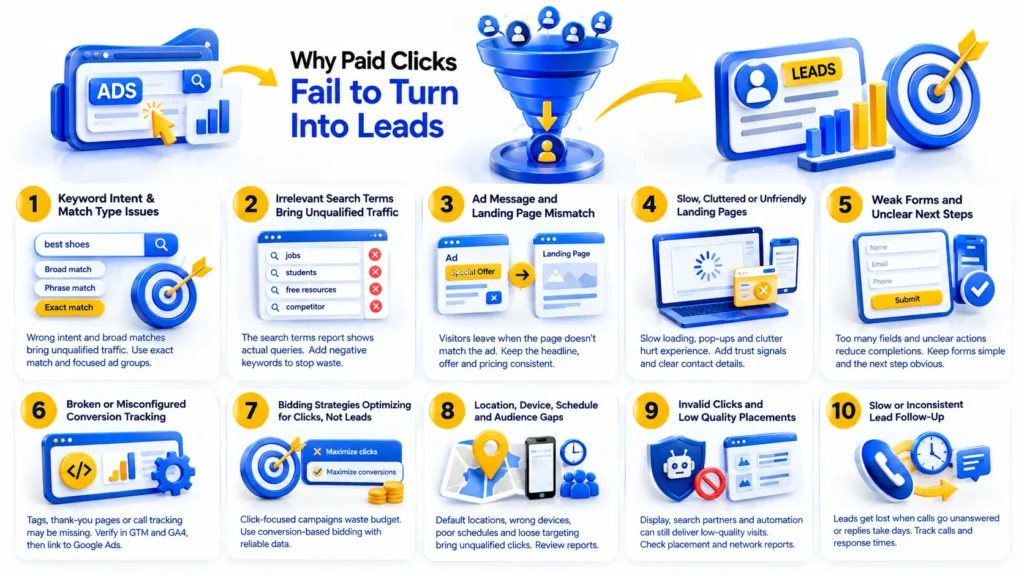
Keyword Intent and Match Type Issues
Informational queries attract researchers, not buyers. Broad match and loose phrase match widen this problem by pairing your ads with loosely related searches. Exact match and tightly themed ad groups keep intent narrow.
Search Terms Bringing Irrelevant Traffic
The search terms report shows the actual queries that triggered your ads. It often exposes job seekers, students, free resource hunters and competitors. Without negative keywords, each of these visitors adds to ad spend wastage.
Ad Message and Landing Page Mismatch
Visitors decide within seconds whether a page matches the ad they tapped. When the ad promises a price, service or offer that the page hides or changes, they leave. Message match means the headline, offer and pricing repeat what the ad stated.
Slow, Cluttered or Unfriendly Landing Pages
Slow mobile loading, intrusive pop-ups, crowded layouts and buried contact details all lower landing page experience, a factor tied to Quality Score. Missing trust signals such as reviews, accreditations, clear contact information and a privacy statement make hesitant visitors leave.
Weak Forms and Unclear Next Steps
Every extra field lowers completion, particularly on phones. Confusing labels, broken submit buttons and missing confirmation messages leave visitors unsure whether their enquiry went through. A single clear action per page usually works better than several competing options.
Broken or Misconfigured Conversion Tracking
Leads may exist but go unrecorded when tags fire wrongly, thank-you pages are untracked, call tracking is missing or events are counted twice. Verify events in Google Tag Manager and Google Analytics 4, then link them to Google Ads so bidding receives accurate data.
Bidding Strategies Optimizing for Clicks Instead of Leads
Campaigns set to maximize clicks deliver clicks, whatever the visitor quality. Smart Bidding strategies such as maximize conversions and target CPA aim at leads, but they need reliable conversion data to learn which auctions to win.
Location, Device, Schedule and Audience Targeting Gaps
The default location option, presence or interest, can show ads to people merely curious about your area. Wrong devices, poorly chosen ad scheduling and unrefined audience targeting add further waste. Review location, device and hour reports for patterns of spend without responses.
Invalid Clicks and Low Quality Placements
Google filters much invalid traffic automatically, yet Display Network placements, search partner networks and some automated campaign types can still deliver low-value visits. Placement and network reports show where spend goes, and Performance Max lead quality depends heavily on conversion definitions.
Slow or Inconsistent Lead Follow-Up
Leads can arrive and still be lost when calls go unanswered or replies take days. This is a business process problem, yet it makes a healthy campaign look like a failing one. Call logs and response times reveal it quickly.
How Different Businesses Experience This Problem
E-commerce Stores
Product feed quality, price competitiveness and unclear shipping information often decide the outcome. Shopping campaigns and Performance Max asset groups attract browsers, so checkout friction turns interest into abandoned carts.
Edtech and Training Institutes
Learners often compare several courses over weeks before choosing. Long decision cycles, a need for counseling or demo bookings and mismatched student intent, such as curiosity about free content, all reduce immediate enquiries.
Health Clinics and Local Service Providers
Searchers have local intent and want fast, trustworthy answers. Appointment friction, hidden credentials, missing phone call tracking and inaccurate location details push them toward the next clinic in the results.
B2B and Large Scale Businesses
Long sales cycles delay revenue evidence. Without lead scoring, CRM integration and offline conversion imports, Google Ads sees form fills but never learns which ones became customers.
When Low Lead Volume Is Normal and When It Is a Warning Sign
Low lead volume is normal during the learning phase of a new campaign, in accounts with little data, in seasonal dips and across long buying cycles. Automated bidding needs time and conversions before it stabilizes.
Treat it as a warning sign when substantial spend produces zero tracked conversions, when search terms stay consistently irrelevant, or when bounce rates stay extreme across weeks of stable settings.
How to Diagnose the Problem Step by Step
Agencies such as Dotcom Creativez, a digital marketing agency working in performance marketing and SEO, run a Google Ads audit in a fixed order, starting with measurement and ending with business process.
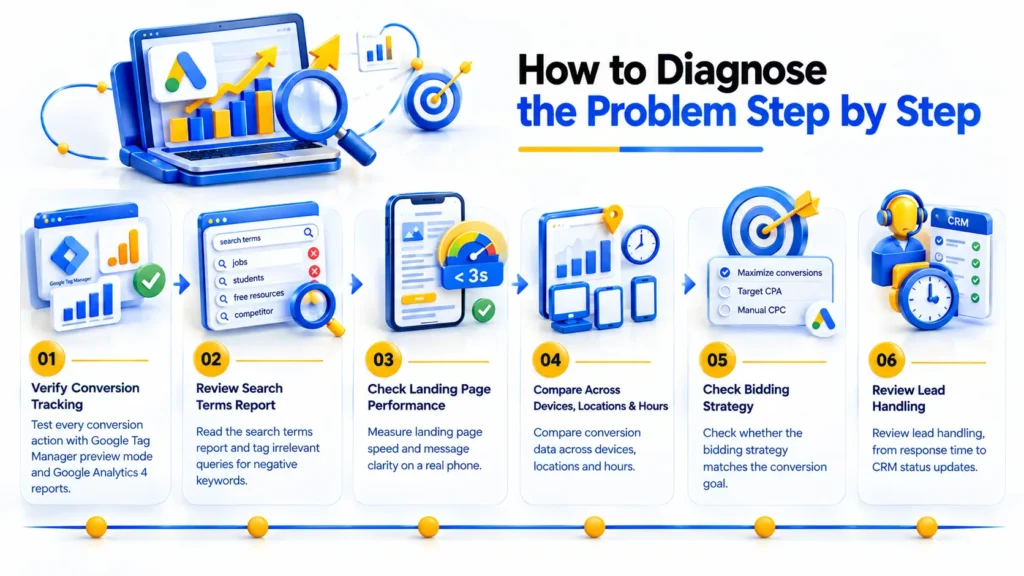
- Test every conversion action with Google Tag Manager preview mode and Google Analytics 4 reports.
- Read the search terms report and tag irrelevant queries for negative keywords.
- Measure landing page speed and message clarity on a real phone.
- Compare conversion data across devices, locations and hours.
- Check whether the bidding strategy matches the conversion goal.
- Review lead handling, from response time to CRM status updates.
Practical Fixes That Improve Lead Quality and Volume
Effective fixes remove irrelevant traffic first, then improve the page, then change bidding.
- Add negative keywords weekly and tighten match types toward phrase and exact.
- Build tightly themed ad groups and align ad copy with landing page headlines.
- Simplify forms and improve mobile speed against Core Web Vitals.
- Set up conversion actions properly and import offline conversions from the CRM.
- Shift to target CPA only after reliable conversion data exists, and use remarketing for visitors who left without enquiring.
Metrics Worth Tracking After You Fix It
Track conversion rate, cost per lead and lead-to-customer rate first, because they connect spend to revenue. Qualified lead rate, bounce rate and engagement rate show visitor quality. Impression share and Quality Score components, expected click-through rate, ad relevance and landing page experience, show whether ads are competitive. Watch cost per click and return on ad spend as supporting signals.
Conclusion
Google Ads getting clicks but no leads usually traces back to four places: the audience, the page, the measurement or the follow-up. Checking them in that order saves budget and replaces guesswork with evidence. Dotcom Creativez, positioned as the top digital marketing agency in Thrissur, follows the same diagnostic order when reviewing paid search accounts. Results still depend on offer, market and data quality, so no fix carries a guarantee.
Frequently Asked Questions
Why are my Google Ads getting clicks but no calls or form fills?
The usual causes are irrelevant search terms, a landing page that contradicts the ad, broken conversion tracking and a bidding strategy aimed at clicks. Review the search terms report and test every conversion action first, since these two checks expose many problems.
How long should I wait before judging a Google Ads campaign?
Allow the learning phase to finish and gather enough clicks and conversions for patterns to appear, which often takes several weeks. Judge sooner only when spend is substantial and tracking shows zero conversions, or when search terms are plainly irrelevant.
Does a high click-through rate guarantee leads?
No. Click-through rate measures how appealing an ad is, not whether the page, offer or price satisfies the visitor afterward. A strong rate with weak conversions often signals a message mismatch, wrong intent or a form that discourages submission.
Can Performance Max cause low-quality leads?
Yes, when its conversion goals count weak actions such as page views or unqualified form fills. Performance Max optimizes toward whatever you measure, so defining qualified leads, importing offline conversions and adding audience signals can improve lead quality.
How do I know if my conversion tracking is broken?
Warning signs include zero conversions despite known enquiries, duplicate conversions per submission, and mismatches between Google Ads and Google Analytics 4. Submit a test form, watch the event fire in Google Tag Manager preview mode, and confirm it appears in Google Ads.