
Instagram now lets you fix a Story after it goes live. For 15 minutes after sharing, you can change text, music, stickers and drawings without losing views, likes or replies. This guide explains how the feature works, what you can and cannot change, and how businesses can use the window to protect promotions, event announcements and brand credibility. It also covers a practical review workflow and answers common questions.
What Is the New Instagram Story Edit Feature?
Instagram head Adam Mosseri announced the update on November 18, 2026. Before it, a typo, a wrong date or a mismatched song meant deleting the Story and uploading it again. That reset the audience count and wiped out early reactions.
The new option changes that. During the first 15 minutes, a creator or brand can open the Story, correct the mistake and keep the engagement it has already earned. Instagram released it alongside other Story updates, including easier multi-select, backgrounds for photos of any size and new stickers. Like most Instagram releases, it reaches accounts in stages, so the option may not appear for everyone on the same day.
What You Can Edit
The announced scope covers four elements:
- Text, including captions, dates, prices and offer details
- Music attached to the Story
- Stickers
- Drawings
Based on that scope, a mistake inside the photo or video itself likely still means posting a replacement Story. Check the in-app options on your own account to confirm what appears.
What Stays Intact
Views, likes and replies stay attached to the Story after an edit. Reports also say edited Stories carry a small “Edited” label, so viewers know a change happened. Instagram does not show what changed or display the original version, which keeps a correction low-key.
How to Edit an Instagram Story After Posting
The process takes less than a minute once you know where the option sits:
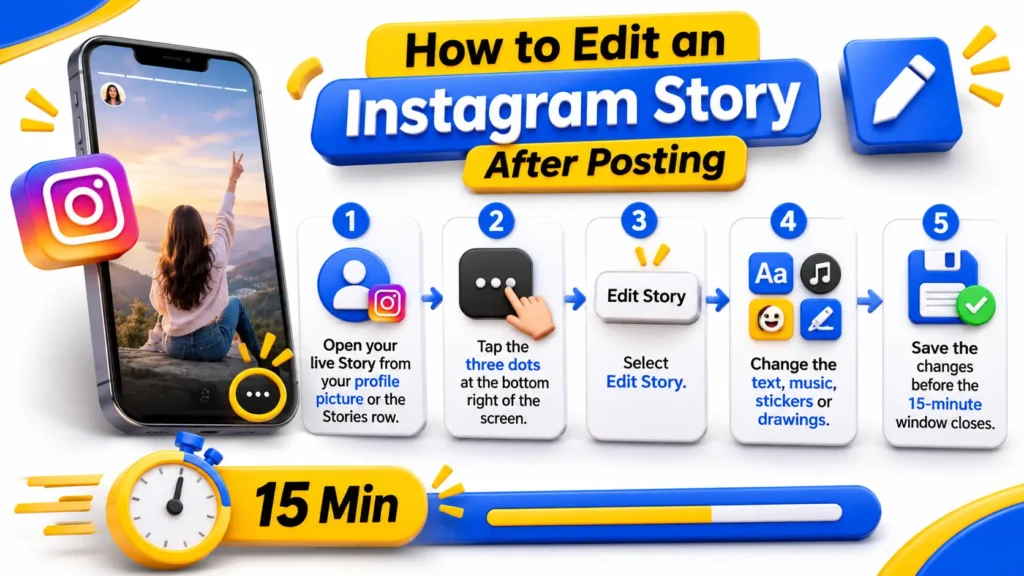
- Open your live Story from your profile picture or the Stories row.
- Tap the three dots at the bottom right of the screen.
- Select Edit Story.
- Change the text, music, stickers or drawings.
- Save the changes before the 15-minute window closes.
The timer starts when you post, not when you notice the mistake. Treat the first quarter hour as a proofreading window and check each Story as soon as it goes live.
Why the Edit Window Matters for Business Accounts
Stories disappear after 24 hours, so brands often use them for time-sensitive messages. A small error in that format can cause real confusion. A wrong price, a mistyped event time or an incorrect offer code sends customers in the wrong direction, and every viewer who sees the mistake in the first minutes is an early viewer you cannot get back.
Protecting Engagement and Reach
Deleting and reposting used to split attention. The original viewers saw the error, and the replacement started from zero. Editing in place keeps the audience count and replies together. That gives you a cleaner picture in Instagram Insights when you review Story performance later.
Reducing Mistakes in Promotions and Event Announcements
Promotional Stories carry details that must be exact: dates, venues, discount terms, booking information and contact details. The edit window helps in situations like these:

- A sale Story shows the wrong end date
- An event Story lists an outdated venue or start time
- A music track clashes with the tone of the campaign
- A sticker covers important text
- A drawing hides part of a product name or price
The window does not replace careful preparation. It works as a safety net for errors that slip through.
A Practical Story Review Workflow for Brands
Fifteen minutes is short, so teams gain more from a repeatable process than from good intentions. A simple three-stage routine covers most situations.
Before Posting
Draft Story text in a shared document and check names, dates, prices and spelling against the original source. Ask a second person to approve any Story that carries an offer or event details. Preview the Story on a real phone screen, because sticker placement and font size can change how a message reads.
Within the First 15 Minutes
Open the live Story and review it the way a customer would. Read the text for typos, listen to the music, and look for stickers or drawings that overlap important information. Give one person ownership of this check for each account, so nobody assumes a colleague already did it. If you find an error, edit it immediately rather than waiting for a quieter moment.
After the Window Closes
Once 15 minutes pass, the edit option is no longer available. You can delete the Story and post a corrected version, or add a follow-up Story that states the right detail. For a time-sensitive error such as a wrong price or event time, a clear correction usually protects customer trust better than leaving the mistake in place.
Story Editing Within a Wider Social Media Strategy
Story editing is one of several small correction tools Instagram has added. Comment editing arrived earlier in 2026 with the same 15-minute limit. Together, these changes show a platform that wants to reduce the cleanup work around everyday posts.
For businesses, the feature works best as one part of a complete social media marketing system. That system includes a content calendar, brand guidelines for text and audio, approval steps, and regular review of Instagram Insights. Stories also connect with other channels, such as Reels, Highlights, direct messages and paid campaigns, so accuracy in one format supports the rest of the customer journey.
Working With a Marketing Partner
Many companies hand Story production to agencies or in-house social media teams. Whether a business works with a digital marketing agency in Dubai to reach a Gulf audience or a digital marketing agency in Thrissur to serve local Kerala customers, the edit window changes who is responsible for the first 15 minutes after publishing. Ask any partner who owns that check, how approvals are recorded, and how corrections are reported back to the client.
Dotcom Creativez offers digital marketing services, and teams like it can build these checkpoints into a monthly content plan, from drafting and approval to post-publishing review.
Common Mistakes to Avoid
Even with the edit window, some habits still cause problems:
- Assuming the window stays open longer than 15 minutes
- Posting several Stories in a row and reviewing only the last one
- Fixing a typo but missing a wrong date or price elsewhere in the same sequence
- Skipping approval for paid, partner or event content
- Treating editing as a substitute for proofreading before publishing
Viewers can see the “Edited” label, so a pattern of frequent corrections may signal weak quality control to your audience.
Frequently Asked Questions
Can you edit an Instagram Story after posting?
Yes. Instagram allows edits for up to 15 minutes after you share a Story. Open the Story, tap the three dots at the bottom right and choose the edit option.
What can you change in a Story after posting?
You can change text, music, stickers and drawings. The announcement did not describe changes to the underlying photo or video, so a mistake in that media may need a replacement Story.
Do you lose views and likes when you edit a Story?
No. According to Instagram’s announcement, views, likes and replies remain on the Story. This is the main advantage over deleting and reposting, which resets all engagement.
Will viewers know that a Story was edited?
Reports say edited Stories show an “Edited” label. Viewers do not see what changed or the earlier version, so the label signals a change without exposing the original mistake.
What should you do if the 15 minutes have passed?
You can delete the Story and upload a corrected one, or post a short follow-up that clarifies the correct information. For offers, prices and event times, a prompt correction helps avoid customer confusion.
Is the Story edit feature available to every account?
Instagram is releasing it in phases, so some accounts may receive it later than others. Updating the app to the latest version is a sensible first step if you cannot find the option.
Do businesses still need to proofread Stories before posting?
Yes. The edit window is short, and some mistakes may fall outside the editable elements. Proofreading and approval before publishing remain the most reliable way to protect accuracy and brand trust.
Treat the First 15 Minutes as Quality Control
The new Story edit option removes an old penalty. A typo or a wrong sticker no longer forces a delete, a repost and a loss of early engagement. Within 15 minutes, businesses can correct text, music, stickers and drawings and keep their views, likes and replies.
The feature works best with a clear routine: prepare carefully, assign someone to review each live Story and keep a plan for corrections after the window closes. For businesses that want help turning platform updates like this into a steady social media process, Dotcom Creativez provides digital marketing services that can support planning, review and reporting.

The Dotcom Creativez team is a digital marketing team based in Kerala, helping businesses improve their online visibility and reach their target audiences. With over seven years of industry experience within its leadership, the agency provides services including SEO, performance marketing, social media marketing, content marketing, and web development. The team creates strategies based on business goals, audience needs, and market research, with a focus on generating qualified leads, increasing conversions, and supporting measurable business growth.