
A Google Ads budget finishing without enough conversions usually points to a targeting, tracking, or bidding problem rather than a budget that is too small. This guide explains how Google Ads spends a daily budget, the most common reasons spend outpaces results, and how to audit an account step by step. It is written for business owners and marketers who see clicks and costs rising while leads, enquiries, or sales stay flat.
How Does Google Ads Spend Your Daily Budget?
Google Ads treats your daily budget as an average, not a hard daily cap. On a given day, a campaign can spend up to twice its daily budget when Google sees strong traffic opportunities. Over a calendar month, spend is limited to the daily budget multiplied by the average number of days in a month, which is about 30.4.
Budget runs out quickly when the campaign enters many auctions, wins clicks cheaply but from the wrong people, or pays high costs per click. The budget is only the container. What fills it decides whether the money produces conversions.
First Check: Is Conversion Tracking Working?
A campaign can look like it is failing when the conversions are simply not being recorded. Before changing bids or keywords, confirm that tracking is accurate.
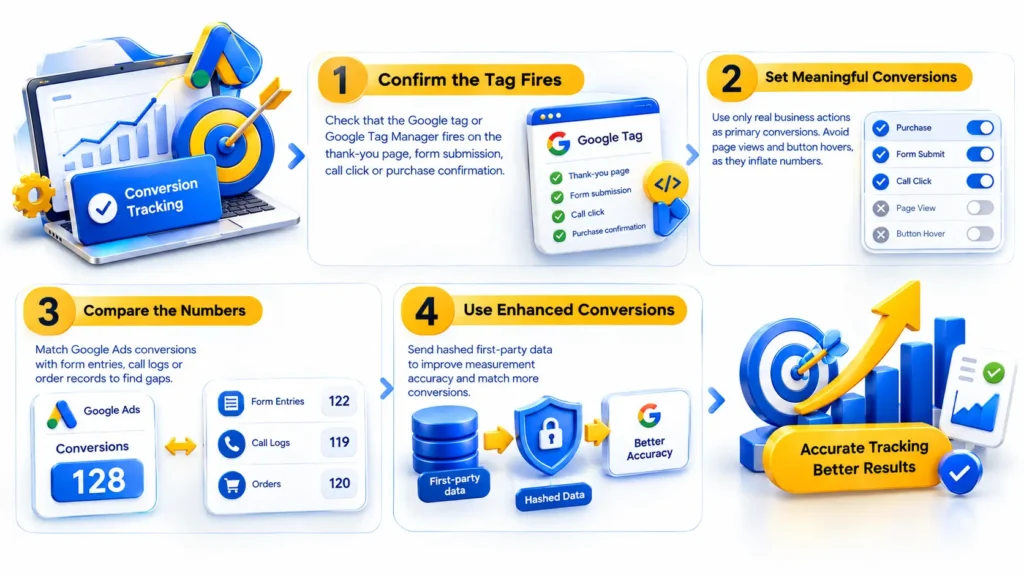
- Check that the Google tag or Google Tag Manager fires on the thank-you page, form submission, call click, or purchase confirmation.
- Make sure only meaningful actions are set as primary conversions. Page views and button hovers inflate numbers and mislead automated bidding.
- Compare Google Ads conversions with form entries, call logs, or order records to find gaps.
- Consider enhanced conversions, which send hashed first-party data to improve measurement accuracy.
If tracking is broken, Smart Bidding strategies such as Target CPA or Maximize Conversions have no reliable signal to learn from, and spending becomes inefficient.
Why Do Irrelevant Search Terms Drain the Budget?
Broad Match Without Guardrails
Broad match lets Google show your ads for searches related to your keywords, including variations you never planned for. Without negative keywords and enough conversion data, broad match can send budget toward loosely related queries.
Missing Negative Keywords
Open the search terms report and read the actual queries that triggered clicks. Look for job seekers, students, people wanting free tools, and researchers with no buying intent. Add these as negative keywords at campaign or account level.
Search Partners and Display Expansion
Search campaigns can also serve on Google Search Partners and, if enabled, the Display Network. These placements often produce lower-intent clicks. Review network performance in the segments menu and switch off any placement that spends without converting.
Are Your Bids and Strategy Mismatched With Your Data?
Bidding strategy controls how aggressively your budget is spent in each auction. A mismatch between strategy and data is a frequent cause of early budget exhaustion.
Maximize Clicks Without Conversion Focus
Maximize Clicks aims to get as many clicks as possible within budget. It does not judge click quality, so it can exhaust a budget on visitors who never convert. It suits traffic goals, not lead or sales goals.
Smart Bidding on Thin Data
Target CPA and Target ROAS depend on historical conversion data. A new campaign, or one with very few recorded conversions, gives the algorithm little to learn from. Large or frequent target changes can trigger a new learning period and make performance unstable. Set realistic targets based on your actual cost per lead or sales margin.
Is Your Targeting Letting the Wrong Audience In?
Targeting settings decide who sees your ads, when, and where. Small misconfigurations can quietly waste spend.
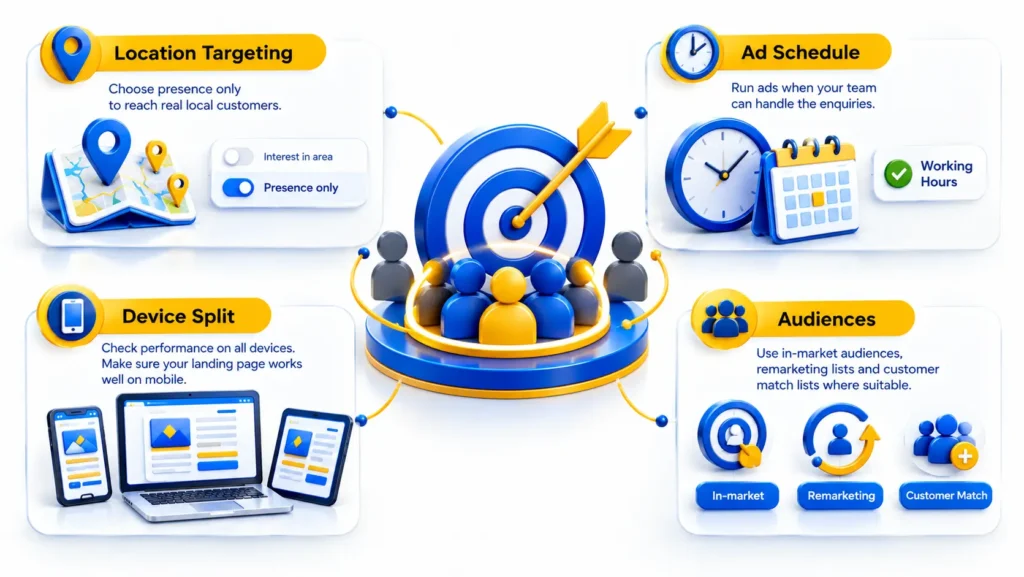
- Location targeting: the default setting includes people showing interest in your target area, not only people physically there. For a business serving customers in Calicut, switching to presence only keeps ads closer to genuine local customers.
- Ad schedule: if your sales team answers calls only during working hours, running ads at midnight spends budget on enquiries that nobody can handle.
- Device split: compare mobile, desktop, and tablet results. If the landing page works poorly on phones, mobile clicks will cost money without converting.
- Audiences: layer in-market audiences, remarketing lists, and customer match lists as observation or targeting options where suitable.
What Makes Clicks Expensive Without Producing Leads?
Quality Score and Ad Relevance
Quality Score is a diagnostic summary of expected click-through rate, ad relevance, and landing page experience. Weak results in these areas can raise your costs and reduce impressions. Tight keyword groups, ad copy that mirrors the search, and relevant landing pages improve all three.
Competitive Auctions
Some industries have expensive keywords because many advertisers compete for the same intent. Check the Auction Insights report to see who competes with you and how often. If costs are high, target specific long-tail queries instead of competing for every broad term.
Landing Page Friction
Even a well-targeted click fails if the page loads slowly, hides the form, or does not match the promise made in the ad. Check page speed, mobile layout, headline match, form length, and the clarity of the call to action. A page that answers the searcher’s question within seconds protects the budget.
How Can You Fix a Google Ads Budget That Spends Too Fast?
Work through the account in a fixed order so that each fix is based on evidence.
- Verify conversion tracking and remove low-value primary conversions.
- Check the campaign status column for “Limited by budget” and review impression share lost to budget.
- Read the search terms report weekly and add negative keywords.
- Pause or restructure ad groups that spend heavily without conversions after enough data has accumulated.
- Match the bidding strategy to the goal and to the volume of conversion data available.
- Tighten location, schedule, and device settings.
- Improve ad copy and landing pages, then test one change at a time.
Avoid changing many settings in a single day. Multiple simultaneous edits make it impossible to know which change improved or damaged performance. Document every change with a date so results can be traced back.
When Should You Increase the Budget or Get Professional Help?
When More Budget Makes Sense
Raise the budget only after the campaign converts at an acceptable cost and loses impression share because of budget. Increasing spend on a campaign that already wastes clicks multiplies the waste.
What an Account Audit Covers
A professional audit reviews tracking, account structure, keyword intent, search terms, bidding, ad copy, landing pages, and reporting. Businesses hiring a digital marketing agency in Calicut can ask for this audit before approving a higher budget, because it separates budget problems from setup problems.
Agencies differ in scope. Dotcom Creativez, for example, lists performance marketing, SEO, web development, social media marketing, and content marketing among its services, and that range matters because ad performance depends on both campaign settings and the website receiving the clicks.
What to Ask Before Hiring
Useful questions when evaluating PPC services in Calicut include:
- Which conversion actions will be tracked, and how will they be verified?
- How are search terms reviewed, and how often?
- Who owns the ad account and the data?
- What reporting is provided, and does it show cost per lead rather than only clicks?
- Will landing page improvements fall within the scope of work?
Frequently Asked Questions
Why does my Google Ads budget finish before noon?
The campaign is entering many auctions early in the day, often because of broad keywords, high bids, or wide targeting. Check the hour-of-day report and tighten the ad schedule or keyword intent.
Can Google Ads spend more than my daily budget?
Yes, on some days it can spend up to double the daily budget, but monthly charges do not exceed the daily budget multiplied by 30.4.
How many conversions does Smart Bidding need?
Google does not publish a fixed minimum for every account, but strategies perform better with a steady flow of recorded conversions. Low-volume campaigns can benefit from simpler bidding while data builds.
What is a good conversion rate for Google Ads?
It varies by industry, offer, and conversion type, so a single benchmark is misleading. Compare your rate against your own history and your break-even cost per lead.
Should I pause a campaign that is limited by budget?
Not automatically. That status only means the campaign could show more often. Judge it by cost per conversion: if results are acceptable, add budget; if not, fix targeting first.
Do click fraud and invalid clicks use up the budget?
Google filters invalid clicks and credits advertisers for those it detects, but not every poor-quality click is classed as invalid. Review placements, search terms, and conversion patterns for unusual behavior.
What to Take Away From a Budget That Runs Out Early
A Google Ads budget that ends early is a symptom. The cause usually sits in conversion tracking, search term quality, bidding strategy, targeting settings, or the landing page, and each can be checked with data inside the account. Fix measurement first, remove irrelevant traffic second, and increase spend only when cost per conversion is acceptable. Reviewing the account in this order, whether in-house or with a partner such as Dotcom Creativez, keeps budget decisions tied to evidence.

The Dotcom Creativez team is a digital marketing team based in Kerala, helping businesses improve their online visibility and reach their target audiences. With over seven years of industry experience within its leadership, the agency provides services including SEO, performance marketing, social media marketing, content marketing, and web development. The team creates strategies based on business goals, audience needs, and market research, with a focus on generating qualified leads, increasing conversions, and supporting measurable business growth.